How to Build Claude Skills 2.0 Better Than 99% of People
The complete blueprint for building reusable AI workflows that remember your business rules, eliminate repeated instructions, and scale across your team. Every technique extracted from Anthropic's Skills 2.0 upgrade.

The Problem Skills Solve
If you've used Claude for more than a week, you've felt all three of these pain points:
The result: you copy-paste the same context into every conversation. Your team produces wildly inconsistent output. And the people who don't know how to prompt well get left behind while everyone else benefits.
Skills solve all three at once. You teach Claude your process once, in a single file. It remembers forever. Everyone on your team gets the same quality output because the instructions are baked into the system, not trapped in one person's head.
This isn't just an update to the AI agent. It's a next-generation feature that lets you teach the AI your business processes and specialized knowledge so that it can grow into an expert tailored to your company's needs.
What Skills Are (And What They're Not)
A Skill is a set of instructions packaged in a simple folder that you set up once and benefit from every time. At its core is a Markdown file called SKILL.md that uses YAML front matter for metadata and contains step-by-step task instructions in the body.
Claude Code loads the appropriate Skill automatically in response to your request and executes the task according to the instructions. No manual skill triggering required. At the start of a session, Claude scans the metadata of all installed Skills and loads this brief information into its system prompt. When your request matches a Skill's description, Claude reads and loads the complete instructions.
Skills are not just "macros" or "templates." They act as a knowledge base that enhances Claude's decision-making abilities. They work with built-in functions such as code execution and document creation, allowing Claude to process complex tasks seamlessly.
A Skill really shines when you have a consistent workflow. Examples from the article:
- Generating front-end designs from specs
- Creating documents in line with your team's style guide
- Responding to PR review comments automatically
- Building presentations that follow brand guidelines
- Organizing market analysis reports with a specific format
The article describes a team that faced three challenges when responding to PR review comments: (1) it was time-consuming to check every review comment, (2) hard to know which comments were unaddressed, and (3) a hassle to communicate the contents of review comments to Claude Code.
By building a Skill for this, Claude Code automatically retrieves unaddressed comments and suggests fixes. The entire workflow is encoded once and runs every time.
Claude Code itself acts as a reference knowledge base, allowing you to directly execute scripts and manage workflows. You define what should be done at what time using a rule-based system. Your "unclear work experience" becomes "explicit rules" that AI can understand.
The 3-Layer Architecture
This is what separates Skills that work from Skills that choke on context. Most people dump everything into one massive SKILL.md. The ones that work use progressive disclosure.
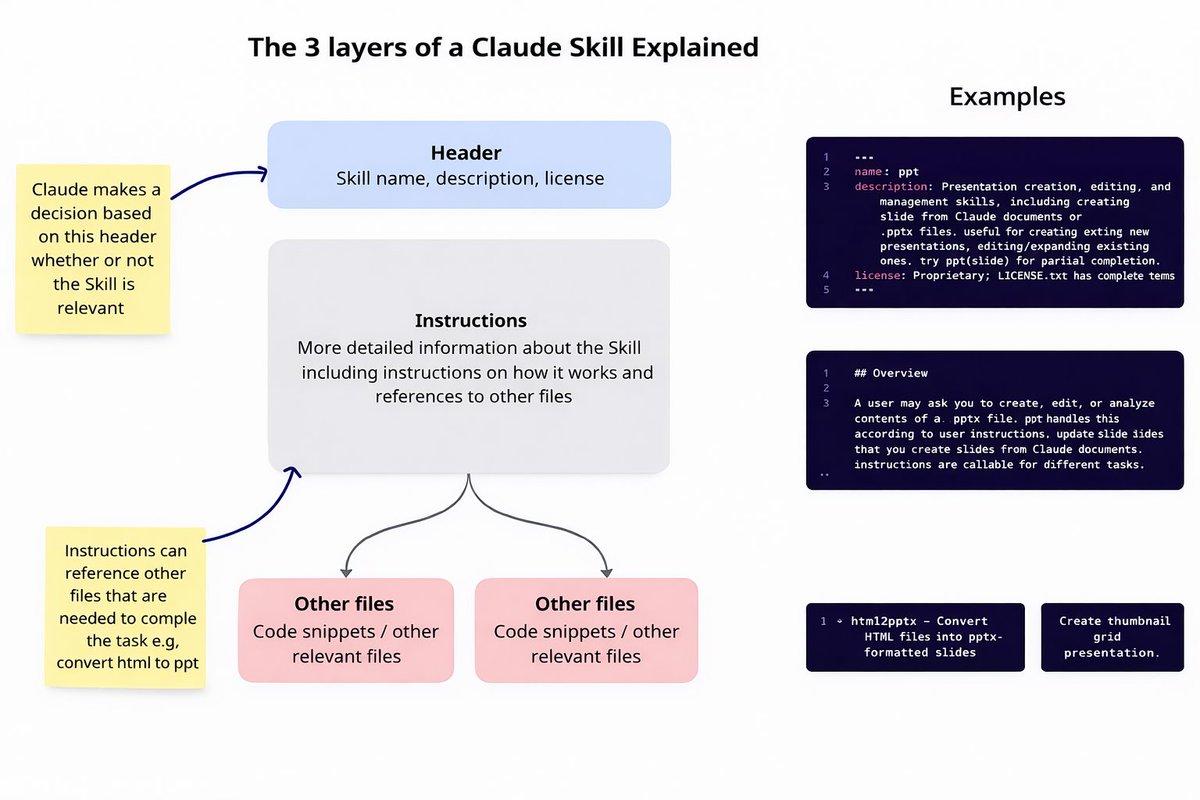
Layer 1: Header (Metadata)
The YAML front matter. Contains name, description, and license. Claude reads metadata at startup and only knows when each Skill exists and when it's available, incorporating it into the system prompt.
Critical detail: the accuracy of whether a Skill actually fires depends heavily on the metadata content. Get the name and description wrong, and Claude won't know when to use it. This is the most important factor in building effective Skills.
Each Skill uses only a few dozen tokens for metadata storage. This means you can install a large number of Skills without impacting model performance due to a full context window.
Layer 2: Instructions (Content Body)
Metadata is always loaded at startup. The content part loads at runtime, only when triggered. When an agent Skill is executed, Claude processes the content section. This is where your step-by-step procedures, format rules, decision logic, and examples live.
The content competes with conversation history and other context. Official best practices: keep SKILL.md under 500 lines. If it exceeds that, split out detailed reference material into separate files.
Layer 3: Reference Files (Other Files)
Use instructions in SKILL.md to guide Claude to load additional files only when needed. This is progressive disclosure: provide the core instructions first, unpack the details as needed rather than loading everything at once.
Code snippets, templates, scripts, and heavy documentation live as separate files in the Skill folder. Claude reads them only when a specific step in the instructions calls for them.
The "progressive disclosure" mechanism makes Skills extremely efficient. The three-layer structure gradually and on-demand feeds information into the model context, avoiding a one-time overload and improving both efficiency and token economy.
Stack 50+ Skills with zero slowdown. Detailed instructions only display in the context window when triggered. For complex Skills, different instructions split across multiple files, and Claude reads only the parts needed for the current task.
How to Write SKILL.md
The Metadata Section (YAML)
This is the real metadata example from the article (a presentation management Skill):
---
name: ppt
description: Presentation creation, editing, and
  management skills, including creating
  slides from Claude documents or .pptx
  files. Useful for creating editing new
  presentations, editing/expanding existing
  ones. Try pptslide() for partial completion
license: Proprietary. LICENSE.txt has complete terms
---
Claude reads this at startup. From this metadata alone, it decides whether to fire the Skill when you ask it to "create a presentation" or "edit these slides." The description must be specific about trigger conditions.
The Content Section
The real content example from the article:
## Overview

A user may ask you to create, edit, or analyze
contents of a .pptx file. Do handle this
according to user instructions. Update slide
slides that you create from Claude documents.
Instructions are callable for different tasks.

## Reference files

html2pptx  - Convert HTML files into pptx-
              formatted slides
thumbnail  - Create thumbnail grid presentation
Two Principles for the Content Section
Principle 1: Only write what Claude doesn't already know.
The Skill-creator guide is explicit about this: "Default assumption: Claude is already very smart. Only add context Claude doesn't already have." General knowledge and programming basics waste tokens. Focus exclusively on: company-specific rules, quirks of internal tools, domain-specific workflows, and team formatting standards. Omit general references to system prompts, programming languages, and libraries.
Principle 2: Match the "degrees of freedom" of instructions to the task.
It's not necessary to specify everything in great detail. The key is to adjust the granularity of your instructions to suit the task:
Text-based instructions. When multiple approaches are effective, like writing and creative work. Give direction, not scripts.
Pseudocode or scripts with parameters. There's a recommended pattern, but some variation is acceptable.
Specific scripts, few parameters. When consistency of procedures is crucial and mistakes are fatal. Lock it down.
Writing Style
The article recommends: avoid lengthy explanations and use an imperative and concise writing style. One of the tricks to creating a highly accurate Skill is determining which parts to omit and where to begin in the content section.
Under 500 lines in SKILL.md
Imperative, concise style
Company-specific rules and formats
Domain-specific workflows
Split heavy docs to reference files
Specific trigger conditions in metadata
General programming basics
Common library documentation
System prompt references
Everything in one giant block
Lengthy explanations for known concepts
Vague descriptions in metadata
Complete File Structure
.claude/skills/
  your-skill-name/
    SKILL.md              # Metadata + core instructions
    reference.md          # Heavy docs (loaded on demand)
    templates/            # Output templates
    scripts/              # Code that runs during execution
      html2pptx.py        # Example: convert HTML to slides
      extract_fields.py   # Example: parse form fields
From the architecture diagram: real Skill directories include files like datasources.md, rules.md, forms.md, spec.md, editing.md, and ossutil alongside SKILL.md. Each file serves a specific function and only loads when the instructions reference it.
Skill-creator: The Auto-Build Loop
Skill-creator is a "meta skill" that lets you create, test, and improve Skills in one automated loop. Instead of manually writing SKILL.md, testing, finding problems, and fixing, Claude does the entire build-test-fix cycle itself.
The 5-Step Loop
- Ask
"What kind of skills do you want to develop?" You describe the task, workflow, or automation you need in plain language.
- Generate
Claude automatically generates a complete SKILL.md draft with metadata, instructions, and file references.
- Test
Claude runs the Skill by actually executing it with a test prompt. Not a dry run. Real execution to see if the output matches what you need.
- Evaluate
Claude reviews the test results against your requirements and proposes specific improvements to the Skill's instructions, metadata, or structure.
- Repeat
Steps 2 through 4 loop until the Skill produces consistently good results. No manual intervention needed. You review the final output when Claude is satisfied.
Real Example Prompt from the Article
I want you to create a skill that helps me
plan a complete one-month app launch.

I need it to break down the launch into
manageable weekly chunks:

  First two weeks: getting everything ready
  (finishing features, creating app store
  materials, setting up marketing)

  Third week: the actual launch (testing
  with a small group first, reaching out
  to press, going live)

  Final week: monitoring how it's doing
  and making quick fixes

Include some templates I can actually use
like launch checklists and social media posts.

The skill should activate whenever I mention
things like "app launch plan" or "launch my
app in 30 days."
From this single prompt, Skill-creator generates the SKILL.md, tests it against a simulated request, evaluates whether the output actually produces a usable 4-week plan with templates, and refines until it works. The key line from the Skill-creator guide: "The main text should only include things that Claude doesn't know."
After installing Skills via the plugin marketplace, check if Skill-creator is available by asking Claude Code directly. Switch to plan mode and describe the Skill you want to build. Skill-creator handles the rest through its automated build-test-fix loop.
MCP vs Skills: Kitchen vs Recipe
If you're already using MCP (Model Context Protocol), Skills are the missing second layer. The article uses one analogy that makes the relationship immediately clear.
Access to tools, ingredients, and equipment. Your CRM, inbox, database, APIs. MCP provides the professional kitchen. It defines what Claude CAN do: the capabilities available to it.
Step-by-step instructions for creating something of value. How to use those tools YOUR way. Skills define what Claude SHOULD do: the specific workflow to follow every time.
The article describes what happened before Skills existed alongside MCP: "When I first built the MCP server, I thought that just providing access to the tools would be enough, but in reality, there was a lack of workflow guidance on how to use the tools, which confused users."
After introducing Skills: "A clear division of roles was created: MCP defined what can be done, and Skills taught how to do it, and the user experience improved dramatically."
Most people have a kitchen full of tools and zero recipes. They connect MCP servers for their CRM, inbox, and databases but never encode the workflows for how those tools should be used together. Skills close that gap.
Agent + Skills + Virtual Machine
Skills don't run in isolation. They're part of a larger architecture where the agent configuration, equipped Skills, and MCP servers work together inside a virtual machine.
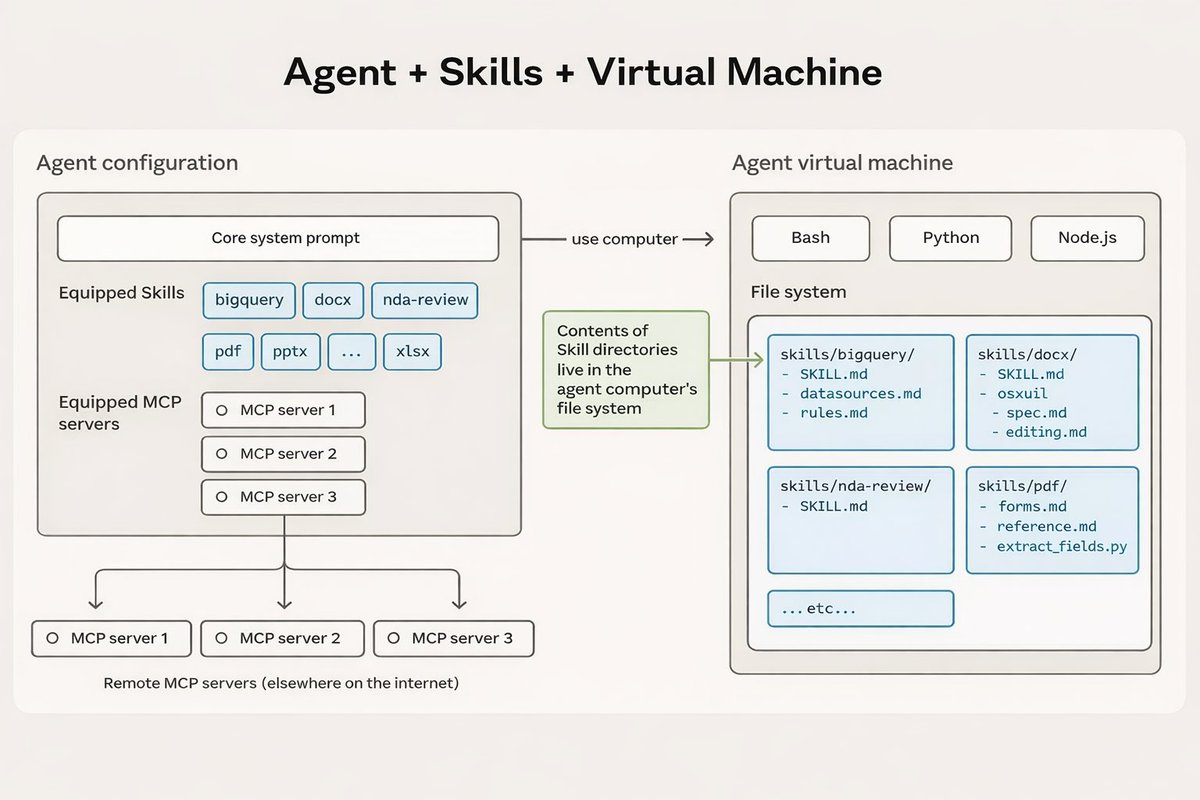
The agent configuration holds three things:
- Core system prompt: the base instructions for the agent
- Equipped Skills: bigquery, docx, nda-review, pdf, pptx, xlsx, and any custom Skills you've built
- Equipped MCP servers: remote connections to external tools and APIs
These connect to the agent virtual machine that runs Bash, Python, and Node.js. The contents of Skill directories live in the agent computer's file system. Each Skill folder contains its SKILL.md plus supporting files:
skills/bigquery/
  SKILL.md
  datasources.md
  rules.md

skills/docx/
  SKILL.md
  ossutil

skills/nda-review/
  SKILL.md

skills/pdf/
  SKILL.md
  forms.md
  reference.md
  extract_fields.py
Key distinction: Skills live locally in the file system. MCP servers run remotely (elsewhere on the internet). Both feed into the same agent configuration. One message from you can trigger a Skill that uses MCP tools under the hood.
The Skills Marketplace
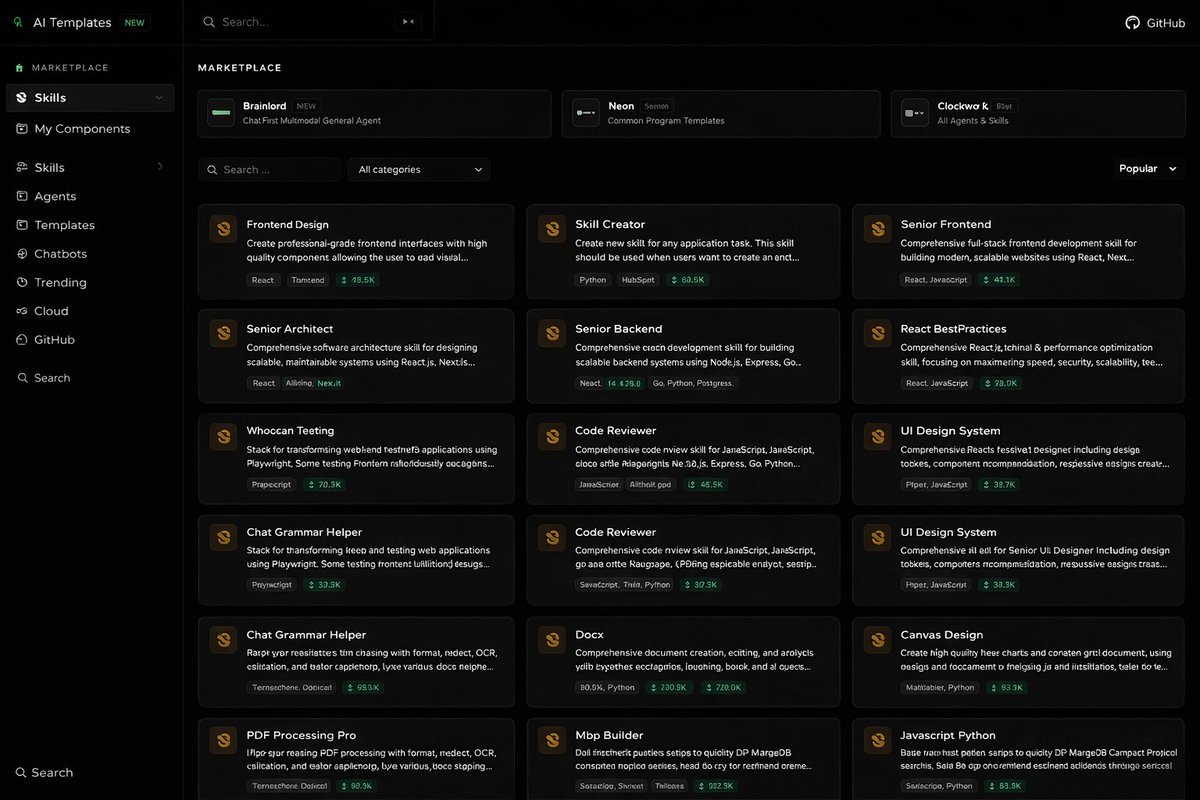
400,856 open-source agent Skills. Growing exponentially. All using the open SKILL.md standard and ready to install.

How to Install
Skills are distributed as plugins through Anthropic's marketplace at agentskills.io. Installation happens through the /plugin command in Claude Code:
# Step 1: Open the plugin manager
/plugin

# Step 2: Add the official marketplace
# Select "marketplace" when prompted
# Enter the official GitHub Skills address

# Step 3: Install skill packs
# Two official packs available:

document-skills   # Excel, Word, PPT, PDF handling
example-skills    # Skill creation, MCP building,
                   # visual design, algorithmic art,
                   # web testing, Slack GIF creation,
                   # theme styling, and more

# Manage installed plugins:
/plugin            # View, update, delete plugins
/skill-creator    # Check if skill-creator is ready

Three Types of Skills
Provided by Anthropic and partners. Powers features like "develop a web application for me," "analyze this PDF document," "write a Snake game and preview it." Production-tested, maintained by Anthropic.
You create them using Skill-creator. Personalized to your exact workflows, rules, and output formats. Upload and share across your team. The most powerful type for business use.
Shared by other users. Download and use directly. Much faster than building from scratch. Ideal for skill selection and modification. Review for security before production use.
When to Create a Skill
Not everything needs to be a Skill. Here's the decision framework from the article.
Build a Skill when you find yourself doing this:
You write a team weekly report every week. Each time you tell Claude to organize the content according to three parts: "this week's achievements, difficulties encountered, and next steps." This is a "Team Weekly Report Generator" Skill waiting to happen.
You need to strictly adhere to brand guidelines: logo usage, brand colors, company name, business content, and professional expectations. Package these into a "Brand Presentation Style" Skill.
Creating a market analysis report requires combining three sets of competitor data, one set of internal sales data, and applying a fixed analytical framework. This entire complex process becomes a "Market Analysis Report" Skill.
Skip the Skill when:
- It's a one-off, occasional request: just state it in the chat
- The task has no repeatable pattern or consistent format
- There's no standard to maintain across multiple uses
If you've explained the same rules, format, or process to Claude more than twice, that's a Skill waiting to be built. Whether you're a product owner, project manager, copywriter, or anyone using Claude in the workplace, Skills reduce repetitive work and ensure consistent output.
Skills transform your "unclear work experience" into "explicit rules" that AI can understand, allowing Anthropic's tools to be perfectly adapted to your needs.